Building a Versatile Digital Toolkit for Educational Design Projects
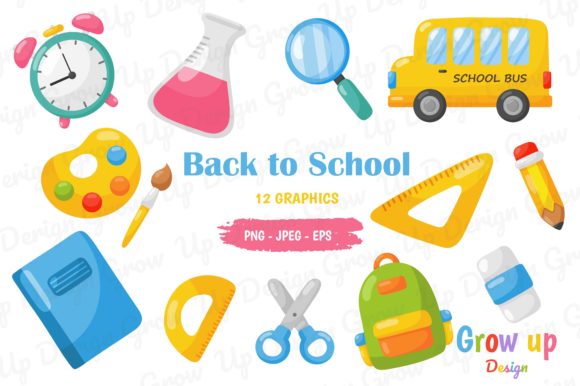
When preparing for a new school term, designing classroom materials, or creating educational content for online platforms, having a reliable set of visual assets can transform a rushed project into a polished production. The Back to School, Education Items Set offers a comprehensive collection of themed graphics that serve multiple purposes across print and digital mediums. This kit includes 12 PNG files at 15×15 inches with transparent backgrounds, 12 JPEG files at the same dimensions with white backgrounds, and one EPS vector file, all at 300 dpi resolution. Understanding how to leverage each file type and format within your workflow can save time, improve output quality, and open up creative possibilities that go beyond simple decoration.
How the Bundle Serves Multiple Creative Workflows
The value of a well-constructed educational graphics set lies in its adaptability. Different users approach design from different starting points, and this particular collection is structured to accommodate a wide range of technical skill levels and project requirements. Whether you are a teacher formatting a bulletin board, a small business owner creating back-to-school marketing materials, or a freelance designer building a themed resource for clients, the components of this set can be mixed, matched, and modified without requiring advanced software expertise.
For Classroom Teachers and Homeschool Educators
Teachers often need visuals that are immediately usable. The JPEG files with white backgrounds are ideal for printing directly onto letter-sized or larger paper, cutting out, and laminating for wall displays, name tags, or learning center signs. Because each image is 15×15 inches at 300 dpi, the print quality remains sharp even when reduced or scaled slightly. The white background eliminates the need for additional cropping or background removal, which is particularly helpful when working with school printers or basic design tools. The transparent PNG versions allow educators to layer graphics onto existing worksheets, slides, or digital assignments without unsightly white boxes around the clipart. This is especially useful when building drag-and-drop activities for interactive whiteboards or creating custom Google Slides presentations for remote learners.
For Graphic Designers and Content Creators
Designers working on educational publications, blog posts, or social media content will appreciate the EPS vector file as a master source. Vector graphics maintain crisp edges and can be scaled to any size without pixelation, making them suitable for large-format banners, book covers, or detailed infographics. The transparent PNG files serve as ready-to-place elements in layout software such as Canva, Adobe InDesign, or Affinity Publisher. Because these PNGs are pre-rendered at high resolution, they can be dropped directly into a composition with minimal adjustment. Designers can also open the EPS file in Adobe Illustrator or CorelDRAW to recolor individual items, rearrange compositions, or extract specific icons for custom branding. This flexibility reduces the time spent redrawing common educational motifs and allows more focus on layout and messaging.
For Small Business Owners and Etsy Sellers
Entrepreneurs who sell educational printables, classroom decor, or digital scrapbooking kits can use this set as a foundation for creating unique products. The consistent 15×15 inch canvas size across all raster files means that items like flashcards, poster sets, or sticker sheets can be produced with uniform dimensions, simplifying listing photography and print-on-demand submission. The high resolution ensures that zoomed-in previews on Etsy or Amazon show clean details rather than jagged edges. The included EPS file allows sellers to modify elements to match their brand colors or to create derivative works such as themed calendar sets, reward charts, or lesson plan templates. Having both transparent and white-background versions of each graphic also means that a single design can be offered in multiple formats to suit different customer preferences.
Understanding the File Formats and Their Practical Roles
Each file format in this educational graphics collection serves a distinct purpose, and knowing when to use which format can prevent quality loss and workflow inefficiencies. The set includes 12 unique designs, each rendered in three different file types, giving you 24 high-resolution raster images plus one master vector file. This redundancy is not wasteful; it is intentional, allowing you to choose the most appropriate format for each stage of your project.
PNG with Transparent Background — Flexibility for Digital Layering
The PNG files use lossless compression and support full alpha transparency. This means that the educational items appear as standalone objects with no background, allowing them to be placed over colored backgrounds, patterned papers, or photographs seamlessly. For example, a PNG of a school bus or a stack of books can be layered onto a gradient background in a video thumbnail or dropped into a classroom newsletter without needing to manually erase a white box. The 300 dpi resolution ensures that these transparent graphics look professional even when printed at full size, though PNGs are most commonly used for on-screen applications such as websites, social media graphics, email headers, and digital whiteboard resources. The transparent format is also ideal for creating stickers or cut files if you plan to use a cutting machine like a Cricut or Silhouette, as the software can detect the transparent areas to define cut lines.
JPEG with White Background — Ready for Print and Presentation
The JPEG files come with a solid white background, which makes them immediately suitable for printing on standard office paper or cardstock. White backgrounds reduce ink usage when the intended surface is also white, and they prevent the transparent areas from rendering as black or checkerboard patterns in programs that do not fully support alpha channels. These JPEGs are perfect for creating physical flashcards, classroom posters, binder covers, or reward charts where the graphic should appear as a self-contained image on a white field. The white background also ensures that the colors of the educational items display accurately against a neutral reference, which is helpful when proofing prints or when the final output will be placed on a white wall or bulletin board. Keep in mind that JPEG uses lossy compression, so the files are smaller and faster to upload or email, yet the 300 dpi resolution preserves sufficient detail for most educational print applications.
EPS Vector File — Scalable and Editable Core
The EPS vector file is the most versatile component for advanced users. Unlike raster images made of pixels, vector graphics use mathematical paths, which means they can be scaled to any dimension without losing clarity. This is essential if you need to enlarge a small apple graphic to fill a poster or shrink a chalkboard illustration for use as a tiny icon on a worksheet. The EPS file can be opened and edited in professional vector software, allowing you to change colors, adjust proportions, combine elements from different designs, or export the artwork as SVGs for web use. For users who need to produce materials in multiple sizes, such as a banner for the school gym and a matching bookmark for students, the vector source provides a single point of truth from which all raster versions can be generated. This reduces inconsistency and ensures that colors and shapes remain identical across all output sizes.
Resolution, Dimensions, and Print-Ready Specifications
All raster files in this collection are rendered at 300 dpi with a canvas size of 15×15 inches. At this resolution, a 15-inch print will show crisp details and smooth color transitions. If you need smaller prints, such as 5×5 inch stickers or 3×3 inch labels, the high source resolution means that downscaling preserves sharpness. Conversely, if you need a slightly larger print, you can scale up to about 20 inches without noticeable degradation, though for best results at larger sizes, exporting from the EPS vector file is recommended. The 300 dpi standard is widely accepted by commercial printers, print-on-demand services, and school print shops, so you can submit these files directly without additional pre-processing. The square format also simplifies layout planning, as many classroom display systems, social media platforms, and online marketplaces favor square or nearly square aspect ratios.
Real-World Applications Across Educational Settings
Beyond obvious uses like bulletin boards and newsletters, this graphics set can support more specialized projects. For special education teachers, the clear, consistent imagery can be used to create visual schedules, choice boards, or communication cards. For school librarians, the set can generate themed signage for reading corners, book displays, or summer reading programs. For tutors and learning centers, the graphics can personalize worksheets and progress charts that make sessions feel more engaging for younger students. The images themselves typically include common school-related items such as pencils, globes, apples, rulers, graduation caps, books, chalkboards, and similar motifs. Because the set includes 12 distinct designs, you have enough variety to build a cohesive theme across multiple pages or products without repeating the exact same graphic.
Event planners organizing open houses, parent-teacher nights, or school orientation events can use the JPEG files to print directional signs, welcome banners, and name tags. The white background ensures that signs printed on colored paper still read clearly, while the transparent PNG versions can be overlaid onto event photo backdrops or virtual meeting backgrounds. For yearbook committees, the illustrations can serve as decorative accents on pages that celebrate academic achievements or mark the transition between grade levels.
Organizing Your Educational Assets for Efficient Workflows
Because the set includes 25 individual files in different formats, maintaining an organized folder structure will save time when you need to locate a specific graphic. A recommended approach is to create subfolders for “PNG Transparent,” “JPEG White,” and “EPS Vector,” and then rename each file with a descriptive title (for example, “pencil_transparent.png” or “globe_white.jpg”). This naming convention makes it easy to search and sort files, especially if you expand your library with additional educational graphics sets in the future. Backup copies of the vector file should be stored separately since it is the only editable master from which new raster variations can be generated.
When collaborating with colleagues or clients, the JPEG files are the easiest to share because they are universally viewable without special software. For projects that require further customization, providing the EPS file along with a note about which vector editor was used ensures that the recipient can modify the artwork as needed. The transparent PNG files are best shared when the receiver plans to use the graphics in a digital layout or composite image, as the transparent background gives them the most flexibility for placement.
The Back to School, Education Items Set is designed to function as both a ready-to-use resource and a creative foundation. By understanding the strengths and limitations of each file type, you can move between print and digital projects with confidence, produce consistent and professional-looking materials, and reduce the repetitive work of sourcing or creating educational clipart from scratch. Whether you are preparing a single classroom handout or developing a full line of educational products, the combination of high-resolution raster images and a scalable vector master provides the depth and flexibility needed to meet a wide range of design challenges.